
Last updated:
Quick answer: On Android, personal post drafts appear as a notification in your status bar. Reel drafts live under Menu → Reels → Create → Drafts. Page post drafts are only reachable through the Meta Business Suite app, under Content → Draft.
Facebook makes this far more confusing than it needs to be, because there is no single drafts folder. Where your draft lives depends on what you were writing and which device you were using, and some drafts expire within days.
Where each type of draft is stored
Start here, since it will save you hunting in the wrong place.
| Draft type | Android | iPhone | Desktop | Kept for |
|---|---|---|---|---|
| Personal post | Notification bar | One draft only, lost when the app closes | One draft only, prompted when leaving the page | Around 3 days |
| Page post | Meta Business Suite app | Meta Business Suite app | Meta Business Suite, in a browser | Until you delete it |
| Reel | Reels → Create → Drafts | Reels → Create → Drafts | Not available | Stored on the device |
The pattern worth remembering: Page drafts are properly saved, personal post drafts are not. If you are writing something you genuinely cannot afford to lose, draft it elsewhere and paste it in.
Personal post drafts on Android
When you start a post and back out without publishing, Facebook offers to save it as a draft and then places a notification in your status bar. That notification is the only reliable way back to it.
Step 1. Pull down your status bar and tap the Facebook draft notification.
Step 2. Your saved drafts appear. Tap the three-dot icon beside one for more options.
Step 3. Choose to open and continue editing, or discard it.
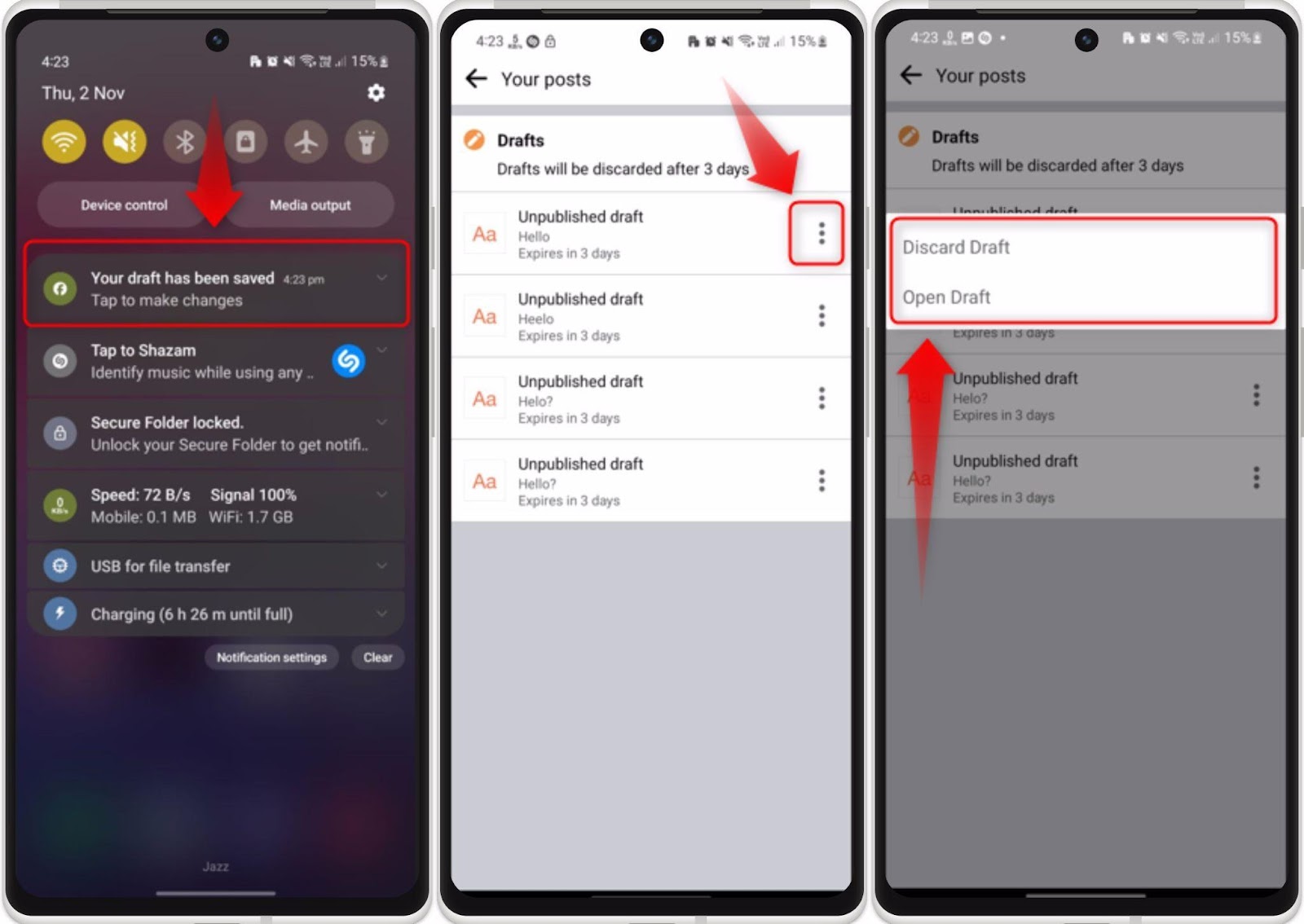
If you already dismissed the notification, the draft is usually gone. Try starting a new post, since Facebook sometimes restores unfinished text into the composer automatically. That is not guaranteed.
Page post drafts (Meta Business Suite)
Drafts for a Facebook Page are handled separately and much more reliably, but the main Facebook app cannot reach them. You need the Meta Business Suite app.
Step 1. Open the app, go to the Content tab, and tap the Published dropdown under Posts.
Step 2. Choose Draft from the menu.
Step 3. Your drafts are listed. Tap one to open, edit or schedule it.
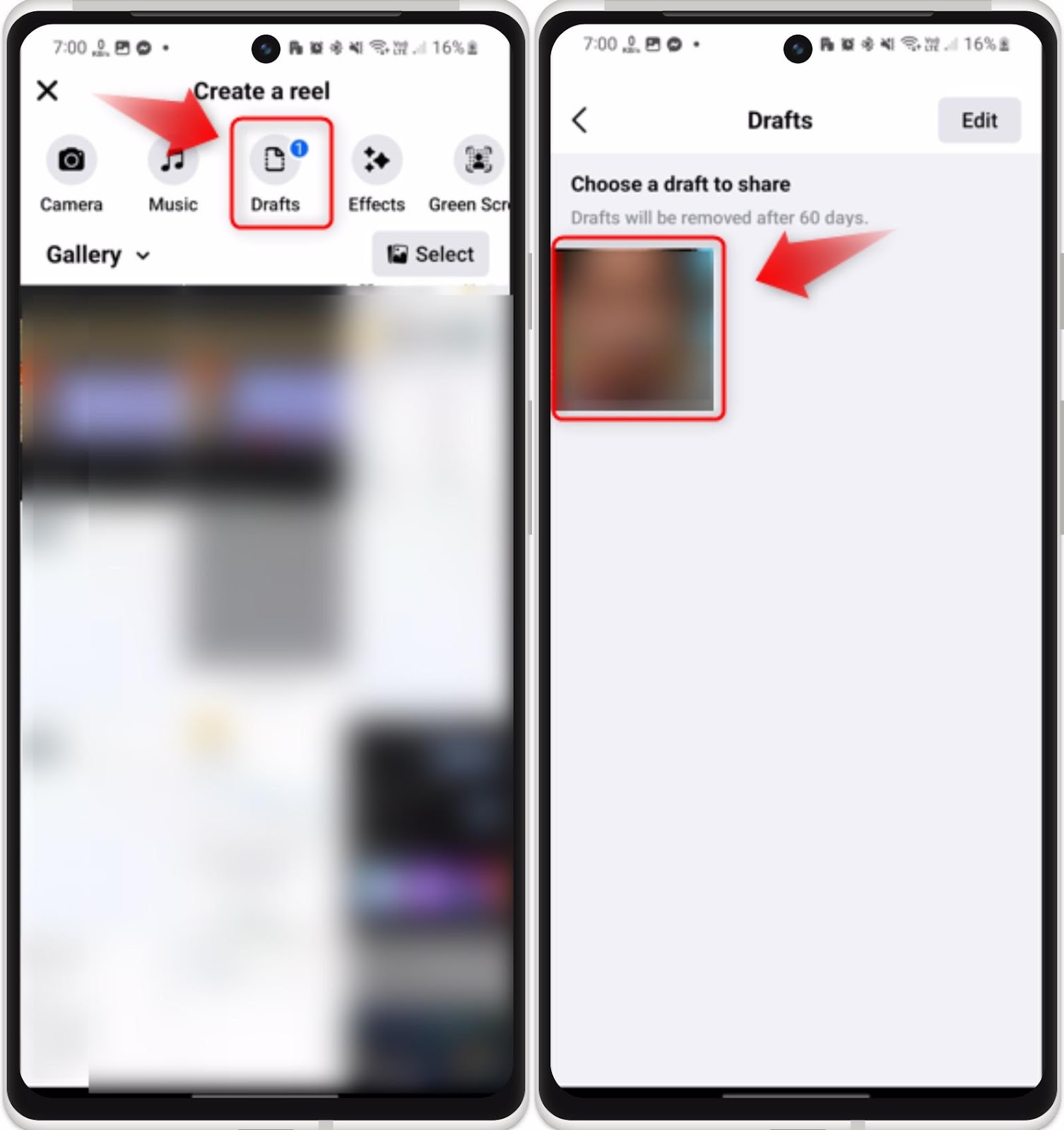
These drafts persist indefinitely and sync across devices, which is why anyone posting regularly for a Page should draft there rather than in the main app.
Reel drafts
Reels keep their own drafts, stored on the device rather than in your account.
Step 1. Tap the hamburger menu in Facebook and open Reels.
Step 2. Tap Create.
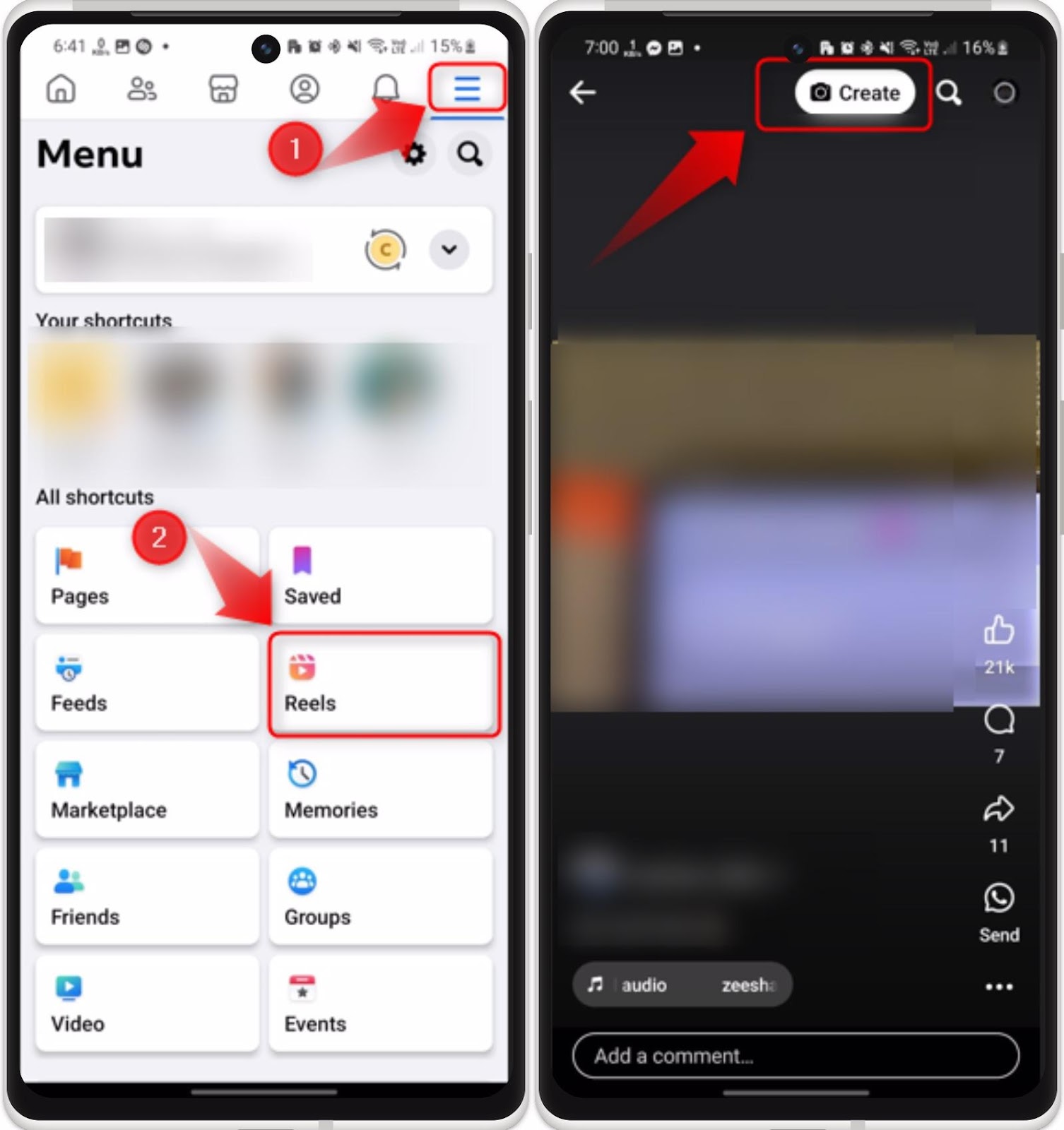
Step 3. On the Create a reel screen, tap Drafts.
Step 4. Open your saved reel to finish editing and publish.
Because reel drafts sit on the device, they do not follow you to a new phone and are lost if you uninstall the app.
Finding Page drafts on desktop
On a computer, personal post drafts barely exist. Facebook holds one unfinished post and prompts you to keep or discard it when you navigate away. Page drafts, however, are fully accessible.
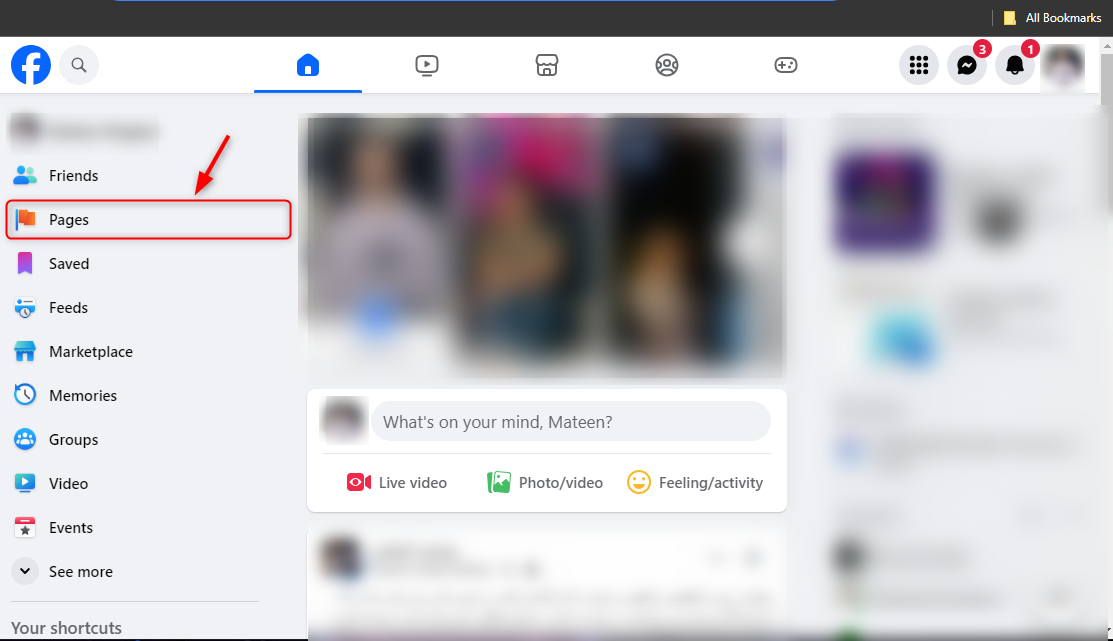
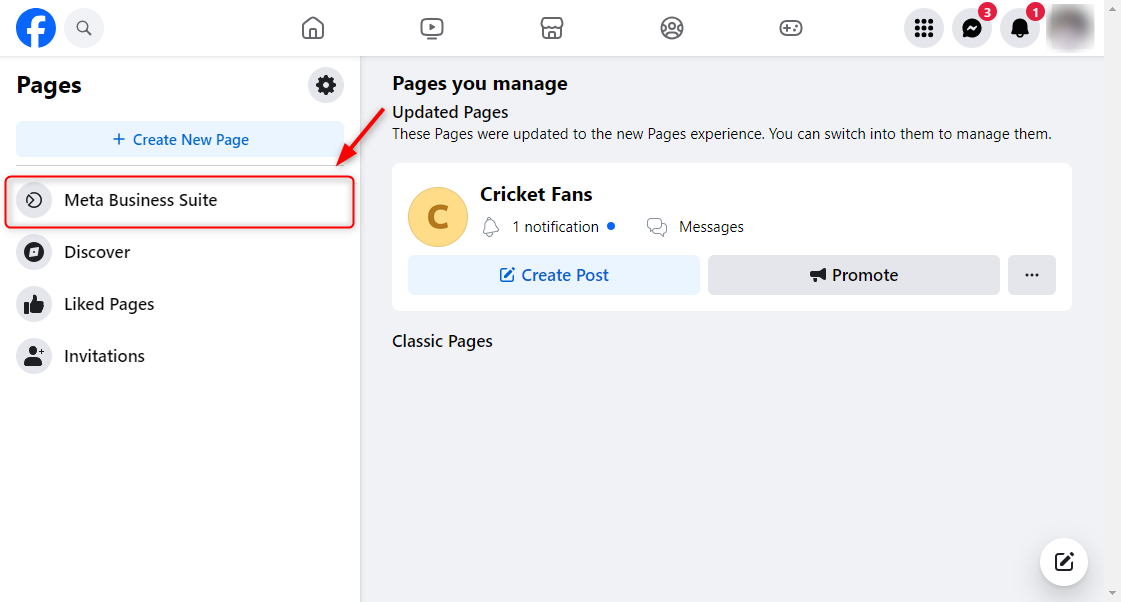
Step 1: Open the Pages section
Open Facebook in your browser and select Pages from the left column.
Step 2: Open Meta Business Suite
Click the Meta Business Suite option.
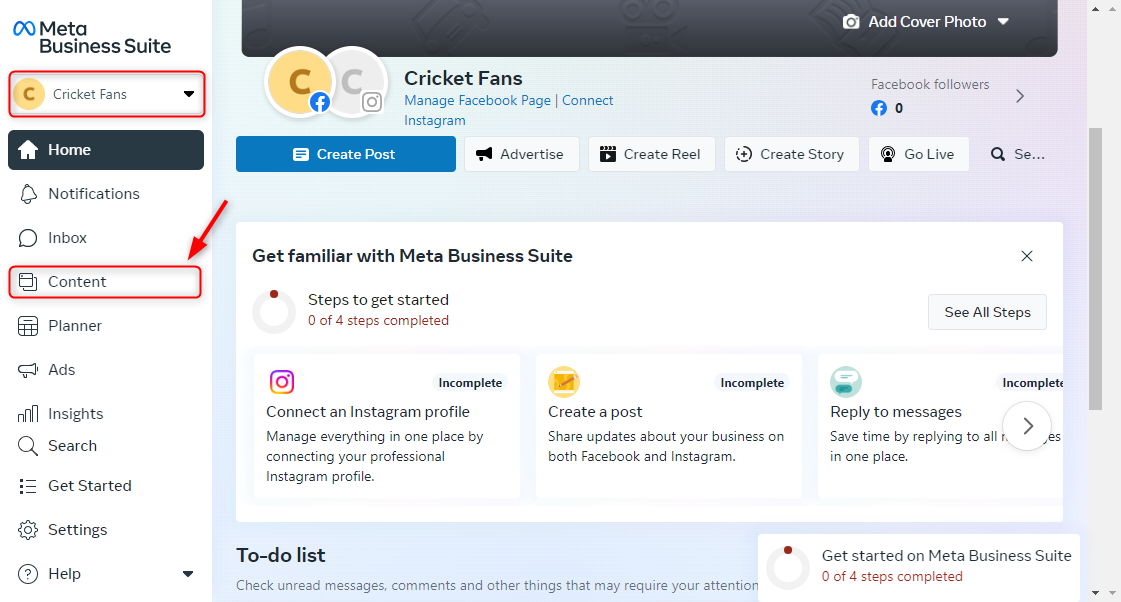
Step 3: Go to Content
With Business Suite open, choose Content in the sidebar.
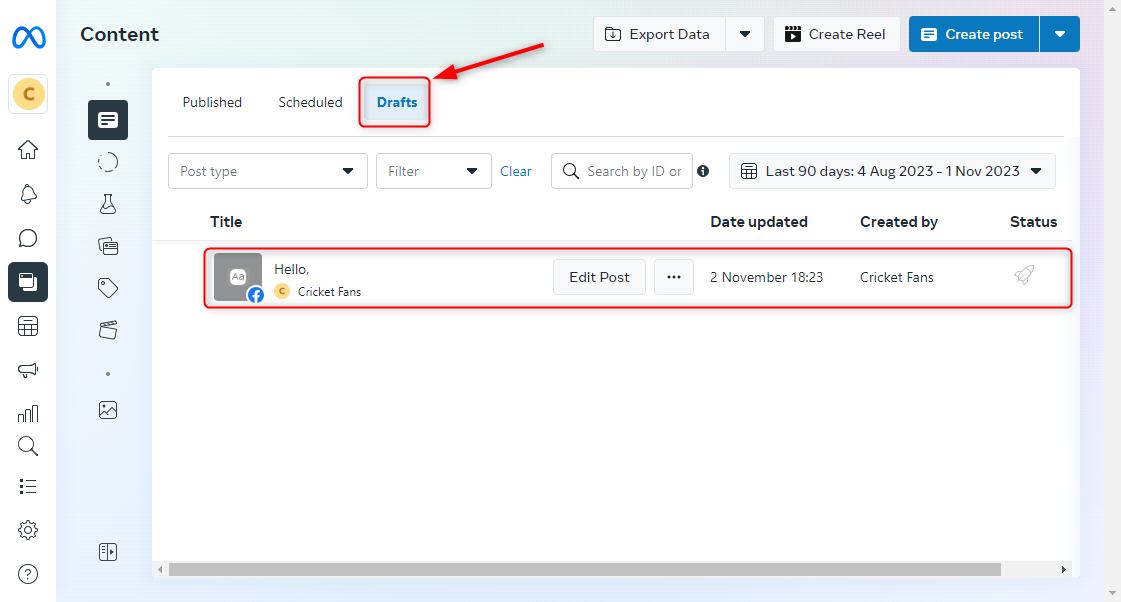
Step 4: Open your drafts
Select Draft on the Content page to see everything you have saved.
On iPhone
iOS behaves like desktop for personal posts: Facebook holds a single draft, and it is typically lost once you close the app. For anything you need to keep, use the Meta Business Suite app from the App Store, which works the same way as the Android version described above.
When your draft has vanished
| Situation | What happened | What to do |
|---|---|---|
| Notification dismissed | The main route back is gone | Open a new post to see if text is restored, otherwise it is lost |
| Draft older than a few days | Personal drafts expire automatically | Nothing recovers it. Use a Page draft next time |
| Draft missing after switching phones | Stored on the old device, not your account | Only Page drafts sync across devices |
| Reel draft gone after reinstalling | Reel drafts are device-local | Export the video before uninstalling in future |
| Cannot find Page drafts in the Facebook app | The main app does not show them | Install Meta Business Suite |
| Draft saved on phone, missing on desktop | Personal drafts do not sync | Finish it on the device where you started |
Frequently asked questions
How long do Facebook drafts last?
Personal post drafts are typically kept for around three days before being removed automatically. Page drafts in Meta Business Suite stay until you delete them.
Can I have more than one draft?
On Android you can hold several personal drafts. On iPhone and desktop, Facebook keeps only one at a time. Page drafts have no practical limit.
Do drafts sync between my phone and computer?
Only Page drafts. Personal post and reel drafts stay on the device where you created them.
Is there a character limit?
A Facebook post can run to roughly 63,000 characters, so the limit is not something you will meet in normal use.
Can other people see my drafts?
No. Drafts are private until published. For a Page, anyone with admin or editor access can see and edit them in Business Suite.