
Last updated:
To get the current year in Java, call Year.now().getValue() or LocalDate.now().getYear(). Both return the year as an int (for example 2026), both are part of the java.time API that ships with Java 8 and later, and neither needs a third-party library. If the year must match a specific region, pass a time zone: Year.now(ZoneId.of("America/New_York")).
Every snippet on this page was compiled and run again on 11 November 2026 with OpenJDK 21.0.13 on Ubuntu 24.04, and the text output shown under each heading is copied from that run. The Eclipse console screenshots are from the original article (February 2024), which is why they print 2024. Need a JDK first? See how to install the JDK on Ubuntu and Debian.
Quick answer
import java.time.Year;

public class YearNow {
    public static void main(String[] args) {
        Year year = Year.now();            // a Year object
        int value = Year.now().getValue(); // a plain int
        System.out.println("Year object: " + year);
        System.out.println("int value:   " + value);
    }
}
Output (Java 21, run on 11 Nov 2026):
Year object: 2026
int value: 2026All ways to get the current year in Java
All of these return the same number for most of the year. They differ in which package they come from, what type they return and how they treat time zones. The output column is from one program that called every method in a single run on a server set to UTC.
| Method | Returns | Package | Output (11 Nov 2026) | Use it when |
|---|---|---|---|---|
Year.now().getValue() | int | java.time | 2026 | You only need the year (recommended) |
LocalDate.now().getYear() | int | java.time | 2026 | You already work with dates |
LocalDateTime.now().getYear() | int | java.time | 2026 | You also need the time of day |
YearMonth.now().getYear() | int | java.time | 2026 | Billing periods, month pickers |
ZonedDateTime.now(zone).getYear() | int | java.time | 2026 | The year must follow a named time zone |
OffsetDateTime.now().getYear() | int | java.time | 2026 | You store timestamps with a UTC offset |
Year.now(Clock.systemUTC()) | Year | java.time | 2026 | Servers that must use UTC |
Instant.now().atZone(zone).getYear() | int | java.time | 2026 | You start from an Instant |
Calendar.getInstance().get(Calendar.YEAR) | int | java.util | 2026 | Legacy code (pre-Java 8) |
new GregorianCalendar().get(Calendar.YEAR) | int | java.util | 2026 | Legacy code |
new SimpleDateFormat("yyyy").format(new Date()) | String | java.text | 2026 | Legacy code that needs a String |
new Date().getYear() | int | java.util | 126 (year minus 1900) | Never: deprecated since Java 1.1 |
Method 1: Year.now() (recommended)
java.time.Year is an immutable value that represents one ISO year. Year.now() reads the system clock in the default time zone and returns a Year object. Printing it gives the four-digit year:
import java.time.Year;

public class CurrentYear {
    public static void main(String[] args) {
        Year nowYear = Year.now();
        System.out.println("Current Year : " + nowYear);
    }
}
When you need a number for arithmetic or comparisons, call getValue(), which returns an int:
System.out.println("Current Year : " + Year.now().getValue());
Method 2: Year.now(Clock.systemUTC())
A Clock tells now() which time source and zone to use. Clock.systemUTC() forces UTC, which keeps servers in different regions consistent. A clock is also how you make date code testable: pass Clock.fixed(...) in tests instead of the real clock.
import java.time.Clock;
import java.time.Year;

public class CurrentYear {
    public static void main(String[] args) {
        System.out.println("The Year is : " + Year.now(Clock.systemUTC()));
    }
}
Note: an earlier version of this example put the opening brace after a comment (//Main method{). The brace becomes part of the comment, so javac stops with error: ';' expected. The version above compiles.
The output of the code is as follows: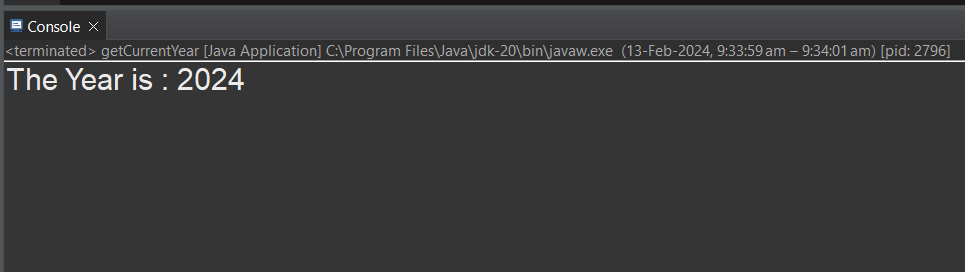
Method 3: Calendar (legacy java.util)
Before Java 8, java.util.Calendar was the standard way to read date fields. Calendar.getInstance() returns a calendar for the current moment in the default time zone and locale, and get(Calendar.YEAR) returns the year:
import java.util.Calendar;

public class CurrentYear {
    public static void main(String[] args) {
        int year = Calendar.getInstance().get(Calendar.YEAR);
        System.out.println("Present Year is : " + year);
    }
}
Method 4: Year.now(ZoneId.systemDefault())
This is the same as Year.now() but makes the time zone explicit, which documents the intent. Replace ZoneId.systemDefault() with ZoneId.of("Europe/London") or any other region ID to read the year somewhere else:
import java.time.Year;
import java.time.ZoneId;

public class CurrentYear {
    public static void main(String[] args) {
        System.out.println("Year is : " + Year.now(ZoneId.systemDefault()));
    }
}
Method 5: LocalDate.now().getYear()
LocalDate holds a date without a time (ISO format yyyy-MM-dd). If your code already has a LocalDate, read the year from it instead of calling the clock again:
import java.time.LocalDate;

public class CurrentYear {
    public static void main(String[] args) {
        LocalDate today = LocalDate.now();
        System.out.println("Present Year is : " + today.getYear());
    }
}
Method 6: GregorianCalendar (legacy)
GregorianCalendar is the concrete class that Calendar.getInstance() returns for most locales. Creating one directly and reading YEAR gives the same result as Method 3:
import java.util.GregorianCalendar;

public class CurrentYear {
    public static void main(String[] args) {
        GregorianCalendar cal = new GregorianCalendar();
        System.out.println("Present Year is : " + cal.get(GregorianCalendar.YEAR));
    }
}
Expected output: Present Year is : 2026. The screenshot below is reused from the original article and shows the console line printed by the LocalDateTime example (Method 10), not this one.

Method 7: YearMonth.now().getYear()
YearMonth represents a year and month such as 2026-11. It is handy for invoices, reports and expiry dates; getYear() returns just the year:
import java.time.YearMonth;

public class CurrentYear {
    public static void main(String[] args) {
        System.out.println("Current Year is : " + YearMonth.now().getYear());
    }
}
Method 8: ZonedDateTime with a named time zone
Use ZonedDateTime when the year must follow a particular region rather than the server. ZoneId.of() takes an IANA region ID such as Asia/Karachi, Africa/Monrovia or America/New_York:
import java.time.ZoneId;
import java.time.ZonedDateTime;

public class CurrentYear {
    public static void main(String[] args) {
        int year = ZonedDateTime.now(ZoneId.of("Asia/Karachi")).getYear();
        System.out.println("Current Year is : " + year);
    }
}
Method 9: SimpleDateFormat (legacy, returns a String)
SimpleDateFormat formats a java.util.Date as text. Use the pattern yyyy (lowercase) for the calendar year:
import java.text.SimpleDateFormat;
import java.util.Date;

public class CurrentYear {
    public static void main(String[] args) {
        Date date = new Date();
        System.out.println("Today date is : " + date);
        SimpleDateFormat yearFormat = new SimpleDateFormat("yyyy");
        System.out.println("The current year is : " + yearFormat.format(date));
    }
}
SimpleDateFormat is not thread-safe, so do not share one instance between threads. In new code use DateTimeFormatter.ofPattern("yyyy") from java.time.format, which is immutable.

Method 10: LocalDateTime.now().getYear()
LocalDateTime holds a date and a time without a zone. Use it when you also need the hour or minute:
Stuck at this step? Ask us, it is free and include the exact error.
import java.time.LocalDateTime;

public class CurrentYear {
    public static void main(String[] args) {
        LocalDateTime now = LocalDateTime.now();
        System.out.println("The year is : " + now.getYear());
    }
}
Method 11: OffsetDateTime.now().getYear()
OffsetDateTime stores a date-time plus a fixed offset from UTC (for example +05:00). It is the type most JDBC drivers and JSON libraries use for timestamps:
import java.time.OffsetDateTime;

public class CurrentYear {
    public static void main(String[] args) {
        OffsetDateTime now = OffsetDateTime.now();
        System.out.println("Current year is : " + now.getYear());
    }
}
Method 12: Instant plus ZoneId
An Instant is a point on the UTC timeline and has no year of its own. Attach a zone with atZone() first, then read the year:
import java.time.Instant;
import java.time.ZoneId;
import java.time.ZonedDateTime;

public class CurrentYear {
    public static void main(String[] args) {
        ZonedDateTime zoned = Instant.now().atZone(ZoneId.systemDefault());
        System.out.println("Current year is : " + zoned.getYear());
    }
}
Method 13: Date.getYear() (deprecated, avoid)
java.util.Date.getYear() has been deprecated since JDK 1.1. It does not return the year: it returns the year minus 1900, so in 2026 it returns 126 (the 2024 screenshot below shows 124). javac also reports it as a deprecated API. If you are stuck with it in old code, add 1900:
import java.util.Date;

public class CurrentYear {
    public static void main(String[] args) {
        Date date = new Date();
        System.out.println("Value Returned is : " + date.getYear());
        int presentYear = 1900 + date.getYear();
        System.out.println("Present year is : " + presentYear);
    }
}
Output on 11 Nov 2026 (OpenJDK 21):
Value Returned is : 126
Present year is : 2026
Why the “current year” depends on the time zone
For a few hours around New Year, the current year is different in different places. Year.now() and LocalDate.now() use the JVM default zone (usually the server’s), which may not be your user’s zone. This program freezes the clock at 31 December 2026, 23:30 UTC and asks four regions for the year:
import java.time.*;

public class YearInZones {
    public static void main(String[] args) {
        Instant moment = Instant.parse("2026-12-31T23:30:00Z");
        Clock fixed = Clock.fixed(moment, ZoneOffset.UTC);

        for (String zone : new String[]{"America/New_York", "Europe/London", "Africa/Monrovia", "Asia/Tokyo"}) {
            ZoneId id = ZoneId.of(zone);
            System.out.printf("%-17s %s  year=%d%n", zone,
                    ZonedDateTime.now(fixed.withZone(id)).toLocalDateTime(),
                    Year.now(fixed.withZone(id)).getValue());
        }
    }
}
Output:
America/New_York  2026-12-31T18:30  year=2026
Europe/London     2026-12-31T23:30  year=2026
Africa/Monrovia   2026-12-31T23:30  year=2026
Asia/Tokyo        2027-01-01T08:30  year=2027
If the year drives something visible (a copyright line, a report filter, an age check), decide which zone is correct and pass it explicitly. To see what default the JVM picked, print ZoneId.systemDefault(); you can override it at startup with -Duser.timezone=Europe/London.
Formatting pitfall: yyyy vs YYYY
In both DateTimeFormatter and SimpleDateFormat, uppercase YYYY means week-based year, not calendar year. For most of the year the two match, so the bug only appears in the last days of December or first days of January:
import java.time.LocalDate;
import java.time.format.DateTimeFormatter;
import java.util.Locale;

public class WeekYearBug {
    public static void main(String[] args) {
        LocalDate date = LocalDate.of(2024, 12, 30);
        System.out.println("Date:       " + date);
        System.out.println("yyyy:       " + date.format(DateTimeFormatter.ofPattern("yyyy", Locale.US)));
        System.out.println("uuuu:       " + date.format(DateTimeFormatter.ofPattern("uuuu", Locale.US)));
        System.out.println("YYYY (bug): " + date.format(DateTimeFormatter.ofPattern("YYYY", Locale.US)));
    }
}
Date: 2024-12-30
yyyy: 2024
uuuu: 2024
YYYY (bug): 2025Use yyyy (year of era) or uuuu (proleptic year, which also handles years before 1 AD) and never YYYY unless you really want ISO week numbering.
More things you can do with the current year
import java.time.LocalDate;
import java.time.Year;

public class YearExtras {
    public static void main(String[] args) {
        Year current = Year.now();
        System.out.println("Current year:  " + current);
        System.out.println("Leap year?     " + current.isLeap());
        System.out.println("Days in year:  " + current.length());
        System.out.println("Next year:     " + current.plusYears(1));
        System.out.println("Last year:     " + current.minusYears(1));
        System.out.println("Two digits:    " + String.format("%02d", current.getValue() % 100));
        System.out.println("Year of date:  " + LocalDate.parse("2019-07-04").getYear());
    }
}
Current year: 2026
Leap year? false
Days in year: 365
Next year: 2027
Last year: 2025
Two digits: 26
Year of date: 2019The last line shows how to get the year from a date string: parse it into a LocalDate and call getYear(). If the string comes from user input, check it first; the same idea applies when you check whether a string is numeric in Java.
Troubleshooting
| Problem | Cause | Fix |
|---|---|---|
error: ';' expected on the main line | An opening brace written after // is part of the comment | Put { on its own line or before the comment |
cannot find symbol: class Year | Missing import java.time.Year;, or compiling with Java 7 or older | Add the import; check javac -version is 8 or newer |
| Year prints as 126 (or 124, 125) | Date.getYear() returns year minus 1900 | Use Year.now().getValue(), or add 1900 in legacy code |
| Wrong year on 31 Dec or 1 Jan | JVM default time zone differs from the user’s | Pass ZoneId.of("...") explicitly |
| Formatted year is one too high in late December | Pattern uses YYYY (week-based year) | Use yyyy or uuuu |
| Random wrong dates under load | A shared SimpleDateFormat used by several threads | Use DateTimeFormatter (immutable) instead |
| Year shows the wrong value in tests | Tests read the real system clock | Inject a Clock and use Clock.fixed() in tests |
FAQ
What is the best way to get the current year in Java?
Year.now().getValue(). It returns an int, reads clearly and avoids the legacy Date and Calendar classes. Use LocalDate.now().getYear() if you already have a date object.
How do I get the current year as a String?
Use String.valueOf(Year.now().getValue()) or Year.now().toString(), both of which return "2026" this year. For a formatted date string use DateTimeFormatter.ofPattern("yyyy").
How do I get the year in UTC instead of the server time zone?
Call Year.now(ZoneOffset.UTC) or Year.now(Clock.systemUTC()).
Does this work on Android?
java.time is available on Android API level 26 and higher, and on older versions through core library desugaring. On very old projects without desugaring, Calendar.getInstance().get(Calendar.YEAR) still works.
If you are organising these snippets into reusable helpers, see how to call a method from another class in Java.