
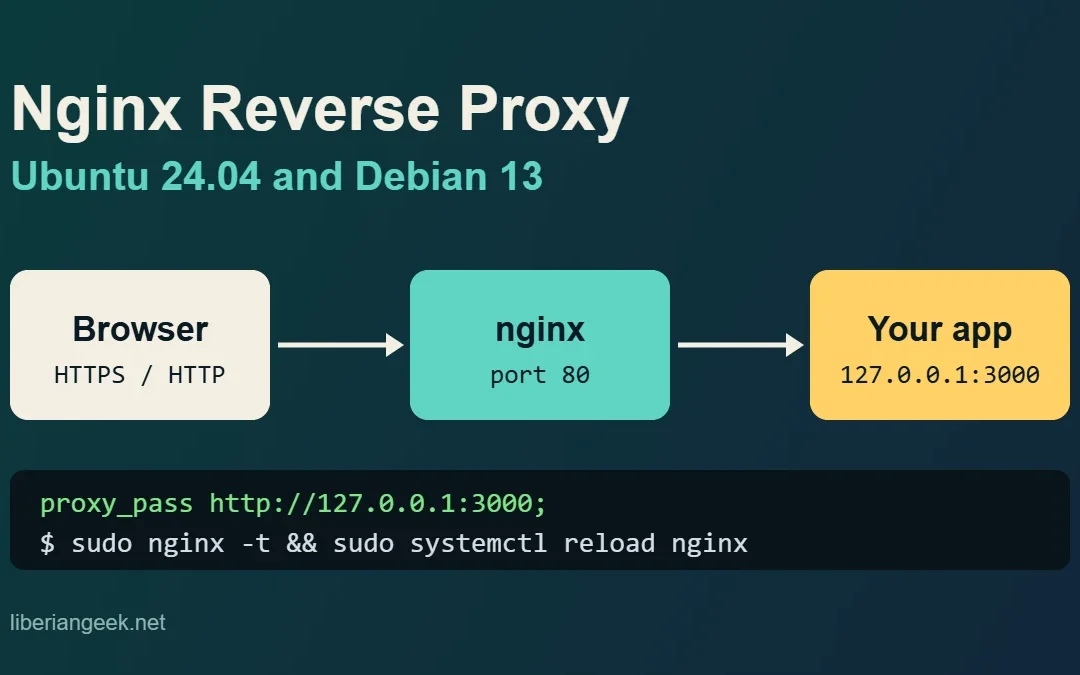
Quick answer: install nginx, create a server block in /etc/nginx/sites-available/ with proxy_pass http://127.0.0.1:3000; plus the Host and X-Forwarded-* headers, enable it with a symlink, run sudo nginx -t, then reload nginx. Everything below was run on Ubuntu 24.04 with nginx 1.24.0 and a small test app on port 3000.
A reverse proxy lets nginx sit in front of an application (Node.js, Python, a Docker container, a dashboard) that only listens on 127.0.0.1. Visitors talk to nginx on port 80 or 443, and nginx forwards each request to the app. You get one public entry point, and the app is never exposed directly. This guide uses a plain HTTP setup first because that is the part that can be tested without a public domain; HTTPS is added on top of the same server block afterwards.
Requirements and versions
| OS | nginx package | Status in this guide |
|---|---|---|
| Ubuntu 24.04 LTS | 1.24.0 | All commands run and shown in the screenshots |
| Debian 13 (trixie) | 1.26.3-3+deb13u7 | Package version checked in the Debian archive; the same config syntax applies, not run on a Debian 13 host |
| Debian 12 (bookworm) | 1.22.1-9+deb12u9 | Package version checked in the Debian archive; not run |
You need root or sudo, an app already listening on a local port (3000 below), and a domain name pointing at the server if you want to use it publicly. If the server is new, lock down SSH first with Harden SSH on Debian 13 and 12.
1. Install nginx and start a test backend
sudo apt update
sudo apt install nginx
nginx -v
The packages from Debian and Ubuntu use the sites-available and sites-enabled layout. If you need a basic nginx walkthrough first, see How to Install and Configure Nginx on Debian.
If you do not have an app yet, this 10-line Python server prints the headers it receives, which makes the proxy behaviour visible. Save it as app.py and run python3 app.py &:
from http.server import BaseHTTPRequestHandler, HTTPServer
class H(BaseHTTPRequestHandler):
    def do_GET(self):
        body=("host=%s\nx-real-ip=%s\nx-forwarded-for=%s\nx-forwarded-proto=%s\nclient=%s\n"%(self.headers.get('Host'),self.headers.get('X-Real-IP'),self.headers.get('X-Forwarded-For'),self.headers.get('X-Forwarded-Proto'),self.client_address[0])).encode()
        self.send_response(200);self.send_header('Content-Type','text/plain');self.send_header('Content-Length',str(len(body)));self.end_headers();self.wfile.write(body)
HTTPServer(('127.0.0.1',3000),H).serve_forever()
Check that the app answers locally before putting nginx in front of it. If this fails, nginx cannot fix it.
curl -s http://127.0.0.1:3000/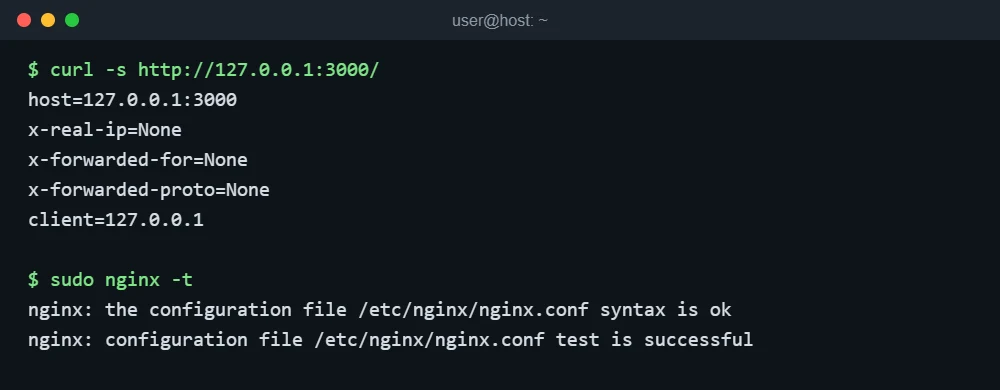
2. Create the server block
Create /etc/nginx/sites-available/app.example.com (replace the name and port with yours):
server {
    listen 80;
    server_name app.example.com;

    location / {
        proxy_pass http://127.0.0.1:3000;
        proxy_http_version 1.1;
        proxy_set_header Host $host;
        proxy_set_header X-Real-IP $remote_addr;
        proxy_set_header X-Forwarded-For $proxy_add_x_forwarded_for;
        proxy_set_header X-Forwarded-Proto $scheme;
    }
}
What each line does:
| Directive | Why it is there |
|---|---|
proxy_pass |
The address of the app. Use 127.0.0.1 so the app is not reachable from outside. |
proxy_http_version 1.1 |
Needed for keep-alive to the backend and for WebSockets. nginx talks HTTP/1.0 to backends by default. |
proxy_set_header Host $host |
Without it the app sees 127.0.0.1:3000 as the host name, which breaks redirects and virtual hosts in many apps. |
X-Real-IP, X-Forwarded-For |
Pass the visitor’s address. Otherwise every request in the app log comes from 127.0.0.1. |
X-Forwarded-Proto |
Tells the app whether the visitor used http or https, so it builds correct links. |
3. Enable it, test the syntax and reload
If the stock default site is still enabled and listens on port 80 as the default server, remove its symlink (the original file stays in sites-available). Then enable your block:
sudo rm /etc/nginx/sites-enabled/default
sudo ln -s /etc/nginx/sites-available/app.example.com /etc/nginx/sites-enabled/
sudo nginx -t
sudo systemctl reload nginx
Always run nginx -t before reloading. A reload with a broken config is refused and the old config keeps serving, but a full restart with a broken config leaves you with no web server. To undo this change, delete the symlink in sites-enabled and reload.
4. Verify that the proxy works
Without DNS you can test by sending the host name yourself:
curl -s -H "Host: app.example.com" http://127.0.0.1/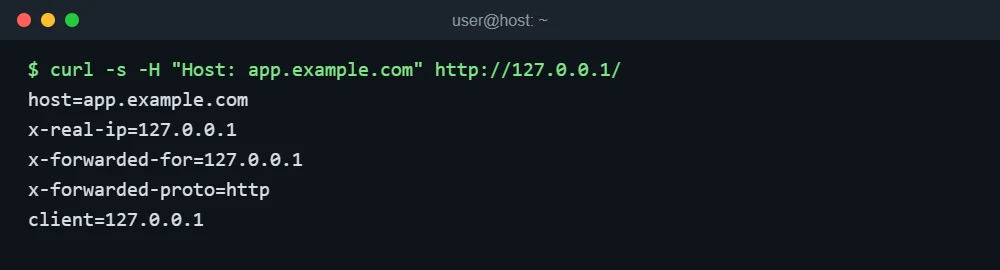
The app now reports host=app.example.com and the forwarded headers, which is the proof that nginx is passing them. In the test above the visitor is the local machine, so the address is 127.0.0.1; from the internet you will see the real client address.
5. WebSockets and large uploads
Two settings cause most “works on localhost, breaks behind nginx” problems. Add this map in a file such as /etc/nginx/conf.d/websocket-map.conf (it must live in the http context, not inside a server block):
map $http_upgrade $connection_upgrade {
    default upgrade;
    ''      close;
}
Then add these lines inside location /:
proxy_set_header Upgrade $http_upgrade;
proxy_set_header Connection $connection_upgrade;
client_max_body_size 10m;
The first two let WebSocket connections upgrade through the proxy. The third raises the upload limit: nginx rejects any request body larger than 1 MB by default, before your app ever sees it. The WebSocket headers were validated here with nginx -t only; no WebSocket client was run. This is the final block:
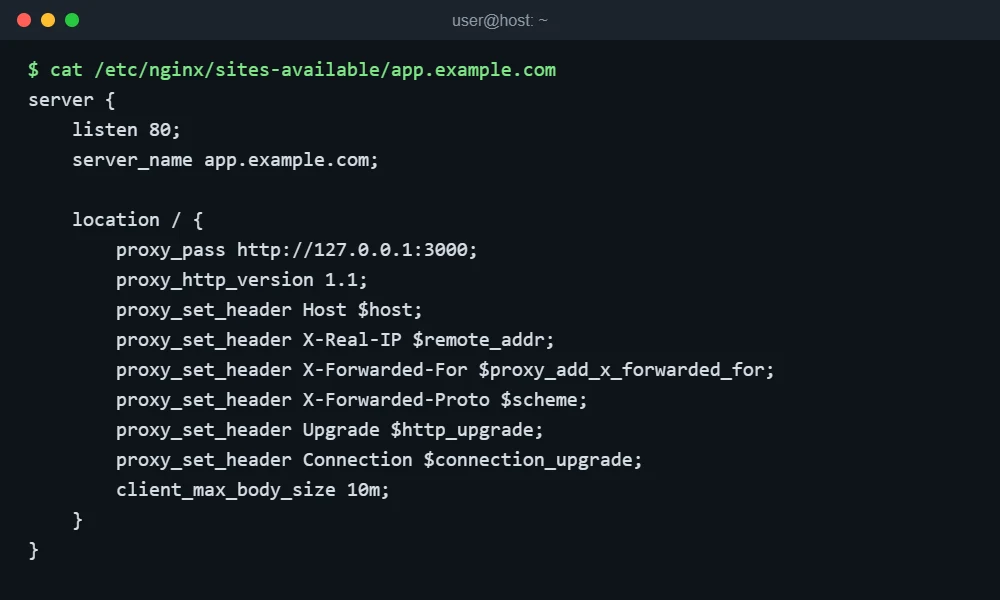
6. Add HTTPS
Once DNS for the name points at the server and port 80 is open, Certbot can edit this same server block to add a certificate and an HTTP to HTTPS redirect. This article did not run Certbot because it needs a real public domain. Keep X-Forwarded-Proto $scheme in place: after HTTPS is enabled it becomes https automatically. Open only the ports you need; a firewall guide is in the Debian server security checklist, and you can confirm what is listening with check open ports on Debian 13.
Troubleshooting
| Symptom | Cause | Fix |
|---|---|---|
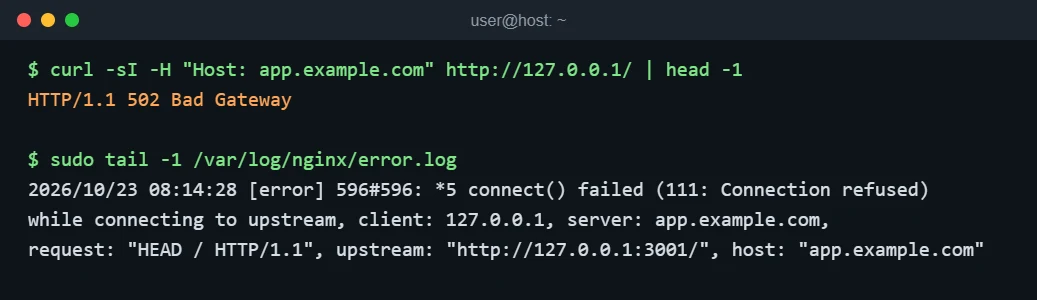
| 502 Bad Gateway | nginx cannot reach the app: wrong port, app stopped, or app bound to a different address | Read the last line of /var/log/nginx/error.log; it names the upstream. Test it with curl http://127.0.0.1:PORT/ and check with ss -tlnp. |
| 413 Request Entity Too Large | Body is over client_max_body_size (1 MB default) |
Raise it in the location or server block, run nginx -t, reload. |
| 504 Gateway Timeout | App is too slow; default read timeout is 60 s | Fix the slow endpoint first; raise proxy_read_timeout only if the delay is expected. Not reproduced in this guide. |
Redirects go to 127.0.0.1:3000 |
Host header not passed |
Add proxy_set_header Host $host; |
| Wrong site shows up | Default site still enabled or server_name mismatch |
Check sudo nginx -T | grep server_name and remove the default symlink. |
The 502 and 413 errors, as logged
Pointing proxy_pass at a port nothing listens on produces a 502 and a clear log line:
And a 2 MB upload against the default limit is stopped by nginx itself:

FAQ
Should the app listen on 127.0.0.1 or 0.0.0.0?
127.0.0.1 when nginx runs on the same machine. Binding to 0.0.0.0 would let people bypass nginx by connecting to the app port directly, unless a firewall blocks it.
Do I need a trailing slash on proxy_pass?
With a bare address such as http://127.0.0.1:3000 the request path is passed unchanged. Adding a URI part (even just /) changes how the matched location prefix is replaced, so only add it when you want to rewrite the path.
Reverse proxy or Cloudflare?
They solve different problems and are often used together: nginx routes traffic on your server, Cloudflare sits in front of it as a CDN and DNS layer. If you use Cloudflare, the client address arrives in a different header and needs the real IP module; that setup was not tested here.